
Softphone
Are you self-employed, or do you run a business with staff who are often on the move? 10Telecom offers an excellent solution to ensure you’re always easily reachable, no matter where you are: a softphone. Below, we explain exactly what a softphone is, what features it offers, and what the pros and cons are.
What is a Softphone?
A Softphone is a software-based VoIP phone that can be installed on an Android or Apple smartphone. By scanning a QR code, the Softphone app is automatically configured – from that moment on, it is connected to the telephone exchange and you can make and receive calls via the app.
What are the advantages of a softphone?
A softphone is assigned its own internal number and can make and receive both internal and external calls. Calls are routed via a 4G, 5G or Wi-Fi connection to your smartphone. When you make an outgoing call via the softphone, you call using the business number. You can also use the softphone to make free internal calls to your colleagues on landlines, cordless phones or other softphones.
A softphone is also a great solution for businesses with staff who are frequently on the move; they often choose to be reachable via a softphone only, so there is no need to purchase physical telephone equipment.
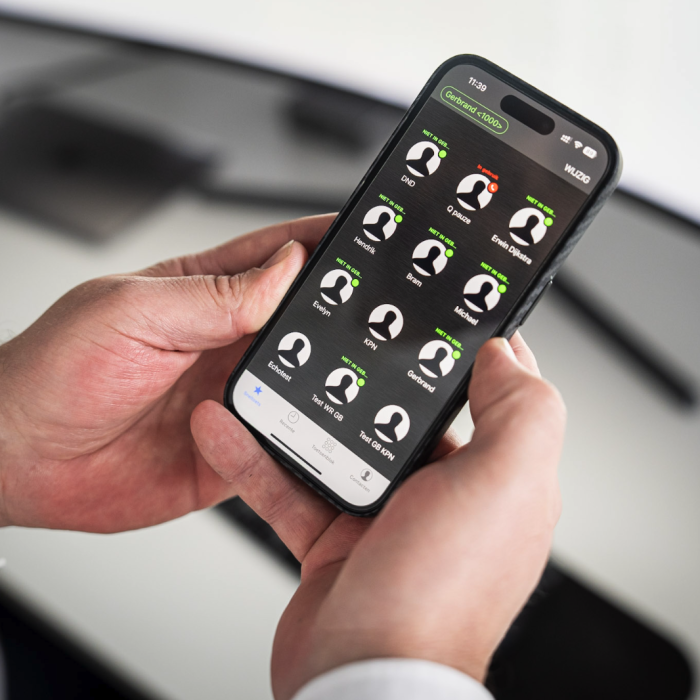
What features does a Softphone offer?
With a Softphone from 10Telecom, you benefit from a wide range of useful features. For example, you can:
Link to the company directory
The softphone app is directly linked to the company directory on the telephone exchange. This means that all business contacts are immediately available via the softphone, without you having to add them manually. If you want to make a call, you can easily choose between the contacts previously saved on your device and those in the company directory.
Save battery life with push notifications
Most softphones only work if they continue to run in the background or foreground of your smartphone. The problem is that this uses up a lot of battery power – after all, the connection must remain open at all times so that you can answer calls. The 10Telecom Softphone App takes a smarter approach. You can simply close the Softphone App. The moment a call comes in, the push notification service ensures that the softphone starts up automatically so you can answer the call. This way, you don’t use up unnecessary battery power and you remain reachable.
Checking colleagues’ availability
Just like on a landline, it’s possible to link BLF (Busy Lamp Field) lights to the Softphone. You can then see at a glance whether your colleagues are on the phone or available to take a call. You can also click directly on the BLF lights to call colleagues.
Toggling switches on and off
The colours of the BLF lights in the Softphone app show whether a switch is on or off. If you press the switch, it will be turned on or off and the switch will change colour.
Are there any downsides to a softphone?
As you’ve read above, a softphone offers many advantages. The only drawback is that call quality can sometimes vary. This is because call quality depends on how strong and stable your internet connection is. For example, when you’re driving, the connection automatically switches between your mobile network provider’s different masts. At the moment of switching, the connection will briefly drop out and then be re-established. When you’re using the internet – for example, streaming – you won’t notice this straight away. But making a call involves real-time data transmission. This means that both the caller and the person being called may experience a brief drop in sound quality at the moment of the handover.
Rates
1 to 9 users
€7.50 per user per month
- All features included
- App on your smartphone
- Make calls via your web browser
- CRM-ERP integration support
- API & webhooks available
- Call monitoring included
- Suitable for making calls with Microsoft Teams
- Monthly cancellation
10 or more users
€5.00 per user per month
- All features included
- App on your smartphone
- Make calls via your web browser
- CRM-ERP integration support
- API & webhooks available
- Call monitoring included
- Suitable for making calls with Microsoft Teams
- Monthly cancellation option